To drive engagement with your Snapchat content, make it feel local, timely, and relevant. This is why, when creating a Snapchat marketing strategy, you need to ensure that users on the platform cannot distinguish your marketing content from other organic content.
To achieve this result, use the features on the platform to make your content feel native. Geofilters are one of such features that can help you connect with your audience effectively. In this article, you will learn how to use Snapchat geofilters to improve your local marketing.
What are Snapchat Geofilters?
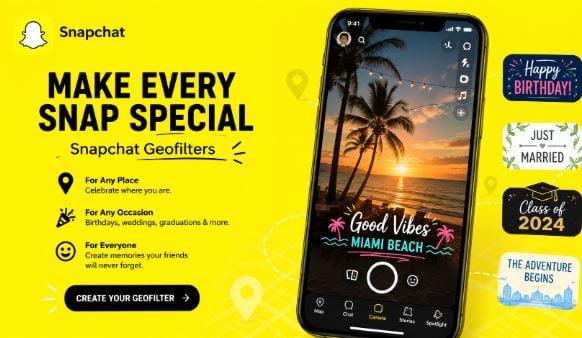
Snapchat Geofilters are location overlays applied to images and videos shown in a specific location. The filters can range from a small area to a large landmark, enhancing stories by including creative artistic elements that can be used in specific moments, events, and places. You can find the Geofilter by swiping right in a Snapchat image.
When you add a geofilter to your snap, anyone at the location can use it in their videos and images, which can be a great way to easily attract a larger audience. If you want to promote an upcoming event, a store opening, or a limited-time offer, you can use geofilters to increase your visibility in a target location and reach your intended target audience. When used with a clear goal, the geofilters are easy to create and can help you increase views, brand recognition, and shares in a simple way. This is especially so when they are combined with Snapchat lenses to attract followers.
Why Use Snapchat Geofilters?
Location-based geofilters use a person's location to send them targeted content. When a user opens Snapchat in a particular area, filters will appear there. This makes them suitable for helping brands to connect with nearby users in real-time. It also enables businesses to speak to the local users without any other steps.
When you use Geofilters in your Snapchat marketing strategy, you put your message where your audience already is. This could be a nearby store, an event, or a venue. These geofilters will only appear when used within the set location. Having such limited access helps to increase interest and drive more interaction. When people feel that certain filters work for their setting, they feel more connected.
Geofilters can help brands to promote their events, such as product launches or local promotions. For instance, someone running a coffee shop can create a geofilter around their Store. Other Snapchat users can have fun sharing, even as they spread awareness about the offer.
The feature can also be a great tool for event organizers. If you are a concert promoter, you can design a filter that becomes available during the show. People attending the show can use the visuals in the post using user-generated content to promote the event.
Geofilters can, therefore, be a great tool for small businesses and large companies alike. Instead of trying to reach a broad audience, you can target people around your current location. When you narrow your focus to a specific geographic location, it saves time and money while increasing your visibility and relevance.
Brands can choose between two types of geofilters: personal or business. No matter the type you use, you just follow the same procedure, only changing the part about whether it's personal or business.
Creating Outstanding Geofilters
The most important thing when creating Snapchat geofilters is to choose those that align with your brand image. The design should clearly illustrate who you are while maintaining user interaction. If a filter contains too many details, it can distract users; maintain a focused, clean design.
When creating your business geofilter, choose elements your brand is already known for, such as slogans, icons, and logos. Then, place them in spots on your screen where they will not block key features of your snap. You can test different areas to determine what works best for different devices.
Use colors that align with your brand's identity, and ensure that they not only stand out but also blend natively within the app. You can use bold text to make your image pop, particularly when someone is snapping quickly or isn't stopping to read.
Consider the role of the filter. Is it for a store launch, an event, a local promotion, or a product launch? Make sure the visuals are tied to the goal so users can understand it before they share it with others. Add the minor details that fit well in those daily moments, such as birthday greetings or seasonal themes.
Don't overbrand in a single area. Instead, spread visual cues across different sections of the frame to prevent elements from feeling crowded or forced. When you select a subtle design, you can be assured that more users will apply and send snaps with the message.
Track which elements users are most frequently tracking and adjust your future filters based on the results. When you find that certain styles are making people share the snaps organically, you can create more of such designs. Make sure the filters look natural in real-life images while still carrying the image forward. When you do them right, you can use them to promote your business while having fun on the platform.
How to Use Geofilters for Local Events and Hotspots
When you use geofilters in high-traffic locations, you can easily increase their usage and views. Therefore, pay attention to the locations where your target audience spends most of their time, which could be sports stadiums, shopping centres, and festivals. People in these locations tend to use Snapchat to share their experiences, and adding the right filter can help them reach other audiences.
Use data to get the right location, and pay attention to previous attendance data for popular venues to craft a filter that reaches more people without wasting your budget on low-traffic locations. Make sure you select the times when there are more crowds, such as during special events, evenings, and weekends.

You can also use them near local businesses, such as gyms, universities, or public parks, to attract frequent Snapchat users. Despite their low costs, these sites can offer a high level of engagement when used wisely. When you rotate the filters across different locations, it is easier to maintain visibility for your business throughout a timeline, be it a week or a month.
In Conclusion
Snapchat Geofilters are among the most effective social media marketing methods and are worth a try if they fit your target audience. Therefore, go ahead and use the steps above to market your business with Geofilters. You can easily grow your account by engaging audiences with the top Snapchat features in 2026.
