When thinking of the kind of content to create on Instagram, many creators usually focus on Reels, static one-image posts, and Stories. One of the most forgotten content formats is the carousel. This is despite the fact that Instagram carousel posts have the highest engagement rate, at 1.36% to 1.92%, compared with one-image posts at 0.45% to 1.04%. They also frequently use outdoor reels for engagement.
That means Instagram carousel posts should be a key part of a strong Instagram content strategy for 2026. When combined with storytelling, they can deliver a high level of engagement and audience retention. In this article, we guide you on using Instagram carousels for storytelling.

What are Instagram Carousel Posts?
An IG carousel post is a form of social media post that allows you to share 20 videos or images in a single post, enabling users to swipe through the post in a sequential, scrollable, and storytelling format. When well-created, these can ensure better engagement than an image post.
Why Use Instagram Carousel Posts?
There are several reasons why carousels should be part of your Instagram content strategy. These include:
- Higher engagement level. In the battle of Instagram carousels vs. reels, research consistently shows that Instagram carousel posts have higher engagement than other post formats. This can be attributed to their interactive nature, where users have to swipe through the content, which translates to a higher watch time.
- Higher visibility. Since Instagram's algorithm now rewards content that has higher engagement with more visibility, and we have seen carousels have the highest engagement, this content format can be a great choice for driving meaningful results.
- When you use an image post, you can only deliver one message each time. On the other hand, carousel posts enable users to add a compelling slide that unfolds from one slide to the next. This makes it easier for brands to explain a complex topic and engage with consumers more.
- Carousel posts can also turn those passive scrollers into active participants. This is because with every swipe, the user discovers another part of the story, ensuring that they remain invested and encouraging them to watch for what will be visible next.
Steps in Creating an IG Carousel Post
Follow these steps when creating IG carousel posts:
- In the same way you create a traditional Instagram post, start by clicking on the + sign.
- You will see a blue icon with some stacked squares. This is the option you need to choose to create a Carousel post.
- Choose up to 10 images from your camera roll that you would like to add.
- If you already feel happy with the image you have chosen, select Add Filters. Remember that your choice of filters will apply to all your images in the carousel, or you can click on the individual picture to choose another filter for each picture.
- If you need to alter the order in which the images appear, tap the image you need to rearrange and hold before dragging it to the position you want it to be.
- Add the caption for your IG carousel.
From the above steps, you can see that the process is almost similar to that of an image post.
Why Use Instagram Carousel Posts for Storytelling
Carousel posts offer brands an opportunity to tell their story in an engaging and captivating way. Since they have a multiple-slide format, it means users can swipe through the series of videos, images, or a combination of the two, resulting in an interactive experience. This is something that isn't possible with a normal static post.
Carousel posts are a good choice for storytelling because they reflect how our brand naturally processes information, one piece each, until it gets the full picture. Every slide acts as a chapter in the narrative, enabling creators to add anticipation, ensure a gradual information reveal, and guide users in the well-crafted journey. Having such a sequential approach can make even more difficult topics accessible and drive your audience's engagement.
When Instagram users swipe through the content, they turn into active participants rather than passive ones, becoming emotionally invested in seeing the next story to the end. This differs from the one-image post where the whole message can be seen. Instead, carousel posts help create a sense of discovery and reward the user with every swipe.
How to Use Instagram Carousels for Storytelling
Due to their versatility, Instagram carousel posts can be used for a number of content formats, such as:
- Product showcase. You can use the posts to show the different angles of the products, use cases, and features.
- Before-and-after change. You can showcase the entire journey using a carousel post rather than just the results. Such a journey enables customers to visualize their own transaction after using your product.
- Educational content. Ensure that the content has been broken down into manageable steps.
- Customer success stories. You can use one frame to show the problem the customer had and another to show how your brand provided them with a solution.
- Industry insight and event coverage.
- Showing the process for your behind-the-scenes videos if it's possible to break down the process into a digestible format.
- Interactive content such as polls and quizzes.
Best Practices for Creating Outstanding Carousel Posts
If you need Instagram carousel Stories that drive engagement, you need to plan carefully. You can do that in different ways, such as:
Planning for the Carousel
Ensure that every slide you add to the carousel serves a particular narrative. The most important thing would be to balance clear messaging with visual appeal, ensuring that the different elements are combined to create a coherent story, encouraging users to swipe until the end.
Begin with a clear goal and an understanding of the audience you want to target. Doing that will ensure that you advance your narrative in every slide while offering value to the viewer. Remember that your viewers are likely to watch the slides on their mobile devices, and therefore each of the slides should look good on these gadgets. Make sure they use some clear, readable text with some high-quality visuals.
Start with a Hook
The first slide will be the most important part of the carousel post, determining if users watch the rest of the slides or they simply scroll past. Therefore, you need to start with a compelling hook that adds curiosity and delivers value.
A good and compelling hook should be:
- Bold and attention-grabbing.
- Interesting enough to drive curiosity.
- Add an interesting data point or statistic.
- Contain a visually appealing graphic or image.
Make sure you add some visual cues encouraging viewers to swipe to the left, such as arrows or even text. You can also add numbers to the slide to enable viewers to understand that there is more waiting.
One of the most effective hooks for a carousel post is the curiosity gap, where you offer users a hint of upcoming valuable information, thereby encouraging them to keep swiping.
Ensure Readability and Visual Consistency
A key element of a good Instagram carousel post is visual consistency. Not only will this help to enhance your brand identity, but it can also help to make your carousels look more professional. To ensure consistency, use a similar aesthetic design, color palette, and font in all your carousel posts, ensuring a more cohesive experience. Use some high-resolution images with clear and readable text so that your message comes out effectively on different screen sizes and devices.
Don't overload each slide with too much information. Instead, include white space and focus on a key message on every slide to enhance comprehension and readability. Make sure you are guiding the viewer from one slide to another by adding smooth visual transitions to drive engagement in the sequence.
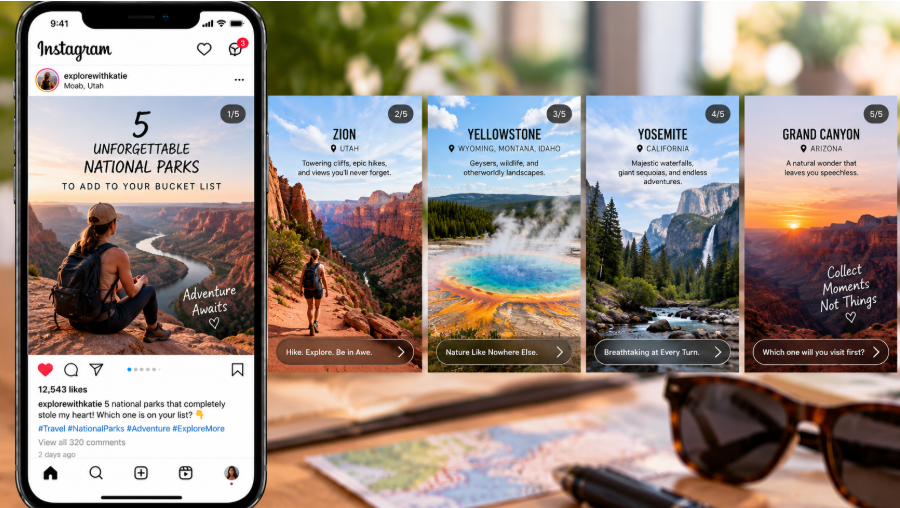
Add CTAs to Drive Action
You need to ensure that your carousel story is supported by a similarly compelling caption. Therefore, add captions to complement the visuals and keep the story going forward. Use your brand voice to ensure an emotional connection with your audience, and make sure the individual slides are concise and add value to the viewer.
When creating the final slide, include a compelling CTA telling the user the action you want them to take, such as visiting your site, buying the product, or even engaging further. To improve the effectiveness of your CTAs, they should be strategically placed in a manner that guides users to take the desired action. Instead of saving the CTA to be added to the final slide, you can add some subtle prompts in the sequence.
You can include interactive elements such as questions, polls, and user-generated content prompts to drive engagement even after the first carousel post. When social media users comment on a carousel post or share it, this will show the algorithm that you are creating valuable content and will promote it to other people.
In Conclusion
With the highest engagement rate, carousel posts can help drive the visibility and growth of your Instagram account. This is especially true when combined with a storytelling format, which is effective for holding viewers' attention. Therefore, use our detailed guide for your carousel post storytelling.
