As the largest long-form video-sharing platform, YouTube is a great way to reach your target audience by combining long-form and YouTube Shorts in your strategy. With statistics indicating that over 500 hours of video content are uploaded every day, the competition for visibility among creators and brands can be stiff. Therefore, you need to optimize every element of your videos to ensure maximum visibility.
According to a study of the top-performing videos, using the right thumbnail can increase your CTR by 30 to 40%. On the other hand, well-optimized titles can increase the CTR by 15% to 25%. This indicates that the thumbnail is one of the most important factors affecting your channel's growth potential. In this article, we guide you on optimizing your title and thumbnails for maximum visibility.
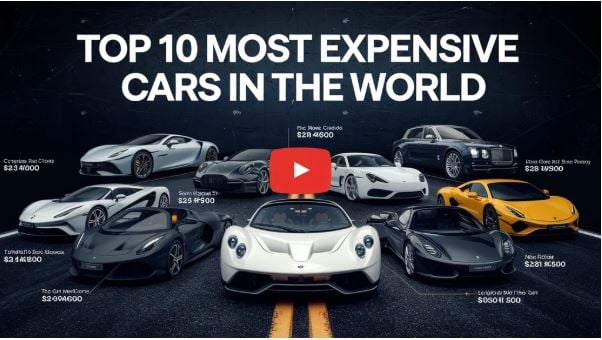
Why Optimize YouTube Titles?
The title is arguably the most important piece of metadata for your YouTube video. Getting this small detail right can transform your channel. But why do you need a captivating YouTube title? Here are a number of reasons:
Offers a Good First Impression
The title is the first thing people will see when they watch your video. Remember that you will be competing for attention with other creators. That means if the title doesn't captivate them, they will scroll to the next interesting video.
Increases the Click-through Rate
A compelling title is an important element for encouraging potential viewers to click and even watch the video. If you want many people to see the video, the title is what will help you achieve this. The YouTube algorithm considers the title to find the right balance. When you add relevant keywords to the title, it becomes easier for YouTube to understand what the content is about and recommend it to the right audience.
Increase Watch Time
With a strong title, you can easily increase your watch time as the title sets people's expectations. They understand what your title promises and are already invested in it.
Tips for Creating an Outstanding YouTube Title
To ensure you have a YouTube title that drives conversion, here are a number of tips to use:
Use the Relevant Keywords
As you may be aware, YouTube is now the second-largest search engine. That means it uses keywords in the title to match users with the kind of content they are searching for, so using the right keywords can make a difference. However, when using keywords in the title, you need to avoid overstuffing them, as you may be penalized.
Keep the Title Brief
When you make your title long, it will get cut off by the search engine on the results page. Therefore, you need to keep the title short and impactful. A good idea is to keep the title to a maximum of 60 characters to ensure it's visible on different devices.
Stir the Viewer's Interest
A good title should be able to generate curiosity and honestly show the role of your content. However, when selecting a title, you need to avoid using clickbait, as this may result in your videos being penalized.
Use a Numbered List
One benefit of using numbers in your titles is that they make your content easier to digest. This informs viewers of what to expect by reading the tips.
Add a Sense of Urgency
Another effective way to make people click on your titles instead of scrolling past is to add a sense of urgency. You can do that by using words such as "Now", "Don't Miss", and "Before it's too late" to add a sense of urgency and FOMO.
Leverage Emotions and Power Words
Words are a powerful way to trigger strong emotions and spark curiosity, which can increase the click-through rate. For instance, instead of writing how to lose weight in 30 days, you can use the secrets of losing weight in 30 days. While the idea remains the same, it consists of a tangible promise that makes it hard for audiences to ignore.
Personalize the Title
Make sure that the title is speaking directly to the viewers so that they can feel like the video is made specifically for them. When you address the viewers in the title, you can connect with them even before the first click.
Match the Title with the Thumbnail
You want to ensure that the title and thumbnail work together to tell a compelling story. If the title is a teaser of something exciting, this should be reinforced by the thumbnail. After all, your opportunity for hooking viewers is limited.
Optimize the Title for Mobile Devices
Many people watch YouTube videos on mobile devices. That means you need to ensure that the title is optimized for viewing on smaller devices. Failure to do that can cause the title to be cut off.
Why Optimize Your YouTube Video Thumbnails?
The choice of a title and thumbnail is one of the most important factors that impact the click-through rate. When your video receives a higher CTR, it indicates to the algorithm that people are interested in your content, causing the algorithm to promote your video more. The more views your videos receive, the more subscribers, revenue, and sponsorships you get.
The impact of a higher CTR tends to compound fast. When your videos rank better, they get more impressions. When you create compelling thumbnails and titles, you show your audience that your content offers value. However, the impact of the thumbnail isn't limited to instant clicks. It's a signal to the YouTube algorithm that you are creating quality content.
If your videos get a high CTR, they will be recommended more by the YouTube algorithm, resulting in a compounding effect and greater visibility. This means the impact of optimizing your thumbnail is compounded beyond the first impression.
The YouTube algorithm assesses the relationship between thumbnail performance and viewer retention. If you have a thumbnail that accurately represents the content of the video, it helps viewers decide whether to watch the video or not. If they choose to watch the video, then they are likely to stay longer, thereby providing the algorithm with another positive signal.
How to Create a Good YouTube Title
Here are tips to optimize your YouTube thumbnails:
Use High-Contrast Colors
One factor that affects thumbnail performance is color performance. When you create a thumbnail with highly contrasting colors, it will perform better than one with a monochromatic design. Some of the best-performing colors for thumbnails are red, bright blue, and yellow, as these can grab attention in the YouTube interface, which is predominantly gray and white.
Make sure the colors contrast strategically, so that the thumbnail will easily stand out in a crowded recommendation feed. The best thumbnail uses some complementary colors that create visual interest and tension, making it harder for users to ignore.
Add a Focal Point
Focal points can be an important factor in directing viewers. According to a study on eye-tracking, the most effective thumbnails are those that guide viewers to a single focal point (the most important element). That focal point acts as a visual anchor, helping viewers understand what the video offers and increasing the chances of users clicking.
The thumbnail should offer a hierarchy with a clear subject in the foreground and a simple background. This method ensures that viewers see the most important message.
Use a Maximum of Three Words
The less text you use in your thumbnail, the better. A good idea is to use no more than three words. Various studies indicate that thumbnails with fewer words perform better than those with longer texts. This is true for different devices, but it's more important for mobile devices, where 70% of YouTube traffic comes from.
Make sure your YouTube text complements the image rather than competes with it, and that the words you use in the video summarize the main message of the content. Where text is necessary, use high-contrast typography with bold, clean fonts that are legible at smaller sizes. The text position will also matter. When you place words in the upper part, these can be obscured by the YouTube timestamp.
Leverage Emotional Triggers
Studies indicate that thumbnails featuring a human face tend to perform better than other options. Such a psychological phenomenon, known as facial recognition, affects the viewer's attention. This can be attributed to our brains prioritizing face processing over other elements.
The emotional expressions captured in the face can also impact performance. Some of the thumbnails with a higher CTR are those that evoke shock, excitement, and curiosity. This is why you might have noticed many YouTube videos now featuring exaggerated facial reactions.
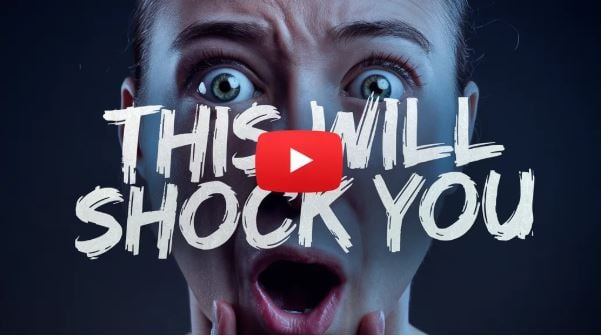
The top creators understand the need to combine the visual content with a compelling short story in the thumbnail. This kind of visual narrative can help to trigger the curiosity of the viewer into the cause of the reaction, increasing clicks.
In Conclusion
The YouTube title and thumbnail are two important features that will impact the click-through rate of your videos. Therefore, you cannot afford to gamble with these two elements. To create outstanding titles and thumbnails, use the above tips.
