One factor that determines whether people will watch your video is the Thumbnail. As the first thing viewers see when they visit your channel, a video thumbnail can create a positive or negative first impression. That means when you have a captivating thumbnail, it becomes easier to convince people to click on the video and watch it.
With the video click-through rate being one of the most critical factors that the YouTube algorithm considers when recommending videos, a good thumbnail will not only encourage people to click on a video but also improve your YouTube SEO. It can, therefore, be a good tool for channels leveraging YouTube SEO to grow their channels. This article will guide you on making a scroll-stopping YouTube thumbnail.
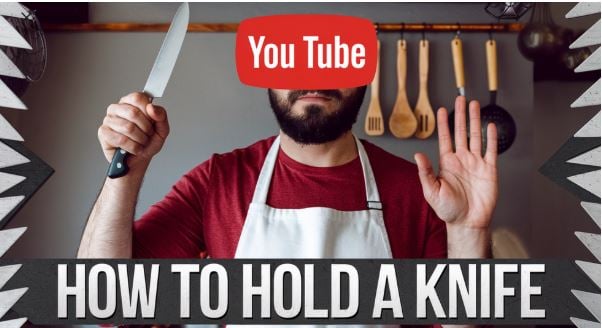
What Are Video Thumbnails and Why Do They Matter?
Thumbnails are small images that get their name from their size, which is roughly the size of a human thumbnail. They are often fast to register and easy to scan. These images serve as mini-posters designed to encourage viewers to click on a video. They are, therefore, essential elements of a video optimization strategy that shouldn't be overlooked.
That said, here are the benefits of a good video optimization strategy:
- Increase the click-through rate. When your video is recommended to prospective audiences, you want them to click on it. Having a good thumbnail will help them click your video, increasing the click-through rate. This is important as the CTR is one of the critical factors that the algorithm considers when ranking videos.
- Capture the viewers' attention. The average viewer's attention span is decreasing. That means you have less than 10 seconds to catch the viewers' attention. A well-crafted YouTube thumbnail will help your brand capture the user's attention more easily and increase your number of YouTube likes.
- Maximize the traffic to your video. When YouTube recommends your video to prospective viewers, the thumbnail is the first thing they see. A good thumbnail will pique the viewer's interest and encourage them to watch the whole video.
- Spread your message. The thumbnail serves as a small poster that conveys to your audience what your video is about.
- Space-saving. A thumbnail lets you convey a lot of information in a small space. You can use the small, tiny preview images to tease your audience.
Top Tips For Creating Captivating YouTube Thumbnails
To make people stop scrolling and click on your videos, use the following YouTube thumbnail tips:
Use the Proper Dimensions of Images
YouTube's recommendation for thumbnail size is 1280 x 720 pixels with 16:9 for its aspect ratio, which is compatible with various devices. While it's possible to upload any file with a minimum width of 640 pixels, it's always advisable to adhere to the recommended dimensions. Otherwise, if you create a stretched, pixelated, or black-bordered image, you will appear as if you don't know what you are doing.
Use Bright and Bold Colors
Another key to success with YouTube thumbnails is using bold, bright, high-contrast elements. When you use bold and bright colors, your YouTube videos can easily stand out in the sea of videos. Bold and high-contrast colors will easily grab attention and increase visibility against the platform's background. This also ensures that the text is readable on even the smallest mobile devices.
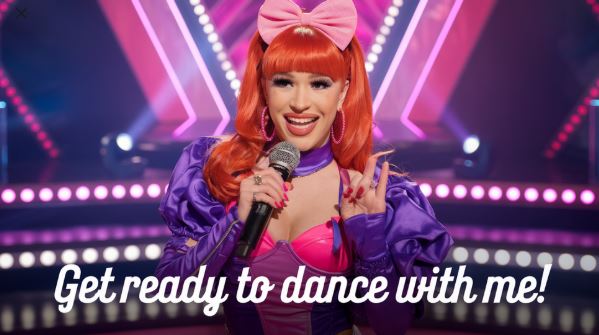
You can also use complementary colors that are opposite one another on the color wheel to increase the effect. For instance, you can apply a combination of orange and blue, green and red, or purple and yellow. These pairings are essential for creating the visual tension that makes your thumbnail stand out and grab attention.
Use a Human Face with Strong Emotions
You have probably come across those YouTube videos featuring a shocked, excited, or sad face. A study on Thumbnails found that 72% of the best-performing thumbnails often featured a human face showing emotions. This can be attributed to the fact that it shows human emotions in a state of shock.
The human brain is more likely to notice faces that convey emotional cues, making the thumbnail particularly effective at grabbing the user's attention, especially in a crowded field. When you display a face with intense emotion, it can be a powerful psychological trigger that sparks curiosity, boosting click-through rates. You can build your trust with your prospective audience by using your face. If you are the shy type, you can use a tool like FaceSwap.
Add a Short and Snappy Text
Even though a video title plays a vital role in a video's searchability, it can easily get lost in the scroll. On the other hand, the viewer's eyes are more likely to be drawn to the bigger and more colorful thumbnail graphics. These can be more effective in providing content for your videos, especially when combined with carefully chosen words.
Ensure your thumbnails are easy to understand, especially for first-time viewers. Otherwise, if your prospective viewers have to spend 10 seconds figuring out what the thumbnail is about, they will ignore it.
Avoid copying other thumbnails or making minor tweaks. Instead, use the text to add context and show your audience what they can expect from the video. The text can also help spark curiosity, provoke debate, and evoke emotions that drive clicks, so make the text relatively easy to read and bold.
Make Your Thumbnails Consistent
Having a consistent thumbnail look will play an essential role in making your videos stand out from the competition and ensure consistent branding. When your channel is cohesive, it can also show your level of professionalism. This can be a good sign to your target audience that they can really trust your brand and its content.
Having consistent thumbnails can also encourage your audience to subscribe to your channel when they find another one of your videos with similar branding. A good idea would be to create a template that consists of your color palette, graphic styles, and fonts to use consistently for both YouTube Shorts and full-length videos. Instead of customizing your YouTube thumbnail from scratch, tools such as Visme and Canva can be used to make your thumbnail template.
Perform the Squint Test
Remember that any image will look smaller on the YouTube screen than it looks in the YouTube software. Therefore, you will need to determine how it will appear as a thumbnail. To help you determine if the design will still be effective, you can squint your eyes to see if the words the thumbnail conveys will still be visible. Some of the questions to ask yourself are:
- Are all the essential elements still visible?
- How legible is the text?
- Does the text look cohesive?
Alternatively, you can minimize the window or move away from your computer to see if the elements will still look good.
Use the Thumbnail to Complement Your Branding
If you are a brand, you need to ensure that the YouTube thumbnails align with the overall visual identity of your brand, including its brand voice, logo, colors, and fonts. Ensure that your thumbnails feature easily recognizable patterns. This is important as the human brain is wired to look for patterns.
If one of the users isn't a subscriber but is casually watching your videos, it becomes easier for them to recognize your content. Since not all YouTube users click the subscribe button, and it's often a vanity metric, you need to ensure that your brand is easily recognizable on YouTube.
The YouTube algorithm also takes note of patterns. It identifies similar thumbnails and considers design when suggesting content. Consider the elements and formats your competitors use and create a similar design. This will help you get more traffic from suggested videos.
In Conclusion
YouTube thumbnails play a crucial role in encouraging viewers to click on a video on YouTube without using clickbait. They act as a banner to market the video to prospective viewers. When the YouTube algorithm detects that people are clicking on your videos, it will recommend more of your videos to them, resulting in increased views and subscribers.
However, you must ensure that you have a scroll-stopping YouTube thumbnail. If you are wondering how to create one, our detailed guide will provide helpful information. You can read our guide on increasing YouTube likes.
