When creating a high-retention YouTube video from start to finish, an important step is to brainstorm content ideas. Without a good video idea, it can be hard to attract viewers. A key resource you can use to get YouTube video ideas is the FAQ section.
When they check out FAQs, many people are seeking instant answers, and videos offer a good way of providing these answers. Therefore, if you are getting many questions in your video comment section or even on your website, these are a great resource to turn into videos. In this guide, we provide you with actionable steps for turning FAQs into videos.

What are FAQ YouTube Videos?
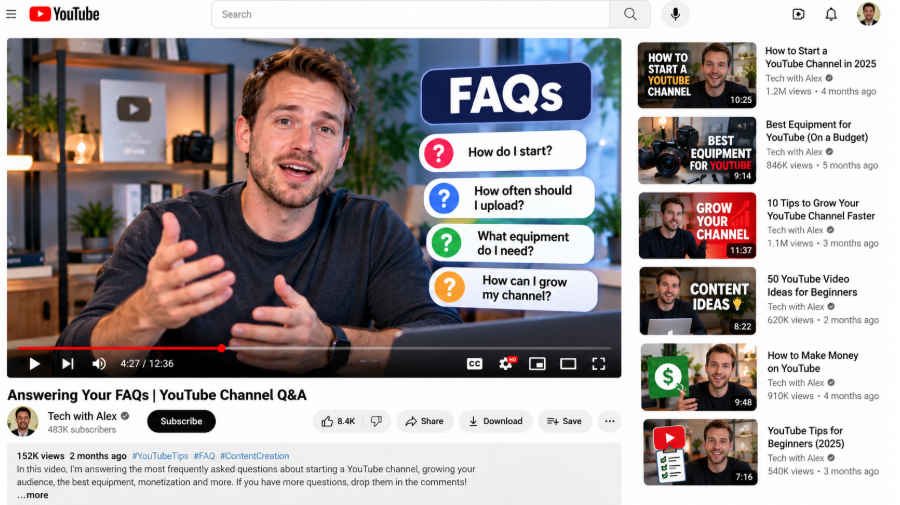
A Frequently Asked Questions video refers to a brief video where you or a team member answers the questions commonly asked by your audience concerning your business, product, or service. The content format doesn't have a specific format and can be in the form of a screencast, a speaking head, or both of them, to match the kind of message you aim to project.
You can use the FAQ video to answer some of your customers' pressing questions in the decision stage of the buying journey. Also, use the video to respond to the customer's questions after making a purchase. That means it is a good choice for nurturing the leads of the people visiting your site or signing up for an email list, but who are yet to purchase from your business. You can use them to delight customers who have ordered from your business but are yet to buy.
Pros of a FAQ Video
There are several reasons why you should consider using FAQ videos, such as:
Popular with Social Media Users
Many studies agree that videos are among the most popular content formats. When you transform your text FAQ page into some short, helpful videos, you can make your customers happy and ensure they see your business as valuable.
Better SEO
82% of social media marketers report that video content has increased their site's dwell time. This is important for search engine optimization because it shows Google that your page is effectively answering the query.
Fewer Support Tickets
You have probably noticed that many calls are coming in over similar issues. If that is happening, the best option would be to create an outstanding FAQ video to minimize the calls and grow the level of customer satisfaction. Studies show that a mere 5% of consumers will call to learn about your business products or services. Therefore, if you have left them to only reach you through customer service, you will be left with some disgruntled clients, and this will mean your customer service team will spend more time answering inquiries.
Higher Level of Brand Loyalty
When you have FAQ videos guiding users on solving a particular problem, it helps show the human face behind your brand and its personality, which can result in a higher level of loyalty. This is especially true when you are creating some recurring characters that are a representation of your business.
Key Elements of an Outstanding FAQ Video
An outstanding FAQ video should be engaging, clear, and concise. There are several key characteristics that should be included. These are:
- Clarity. Ensure that the video provides some clear, though concise, answers to the questions people are asking. Don't include any fluff; instead, elaborate on your point.
- High-quality audio and visuals. Make sure you have clear audio and good lighting. Add some outstanding visuals that can ensure the video is more professional and appealing.
- Accessibility. You should include a transcript, captions, distinct visuals, and other elements that improve accessibility.
- Accuracy: Ensure you are providing a correct answer that is also the latest.
- Personality. Ensure that the video is a true reflection of your personality, whether friendly, quirky, or professional.
- Visual aid. Add screenshots and screencasts to emphasize and support important points.
- Consistent branding. Use the same company colors, logo, and fonts.
Step-by-Step Guide to Creating an Outstanding FAQ Video
To make your video outstanding, follow these steps:
Find Your FAQ Questions
The best FAQ video should be the one focusing on the questions people are asking. Therefore, begin by researching the common questions people are searching for answers to and the problems your people face. This information shouldn't be hard to find.
For instance, you can speak with your customer care team to understand the questions they regularly receive. Also, conduct a customer survey to find out what they are seeking answers to. You can then create a list of some of the common questions people are asking and include multiple-choice answers. You can then save the poll and share it out as a link or to your email subscribers.
Create a Script
Any good video should start with a script, but this is even more so for this video format, as it requires a layout to ensure that you provide your viewers with helpful answers to every question they may have in mind.
Here are tips for creating a better script:
- Script planning. Make sure you get a general idea of the kind of video you are creating. This could be the video theme, its target audience, and where you will post it. Determine the format you will use for the video and the key visual you will use.
- Maintain the flow. One way to do that is to read the script aloud to hear how it sounds.
- Keep it brief. Even when you have a lot to say and a lot of information to share, make sure your video script is brief.
Choose the Type of Video
FAQ videos have different formats depending on your business needs. Some people will be comfortable with a straight-on, on-camera video featuring a happy face. Others may choose to create product videos focusing more on close-up images, some on-screen instructions, and the product features.
For instance, if the video is for a SaaS company, you can add an on-screen demo explaining the usage of the brand. This can help increase watch time to improve social media recommendations.
Draft Your Video Answers
After creating the questions, take your time to answer them clearly and in an easy-to-understand way. Add some other resources, such as links to a tutorial video or a how-to video, for questions that need some in-depth response. Remember that you don't have to explain every detail, as people aren't after the specific detail but only the most important details.
Choose a Platform to Post the Video
The effectiveness of a FAQ video will depend on where you post it. The video can then be added to your YouTube channel, either as long-form content or short-form content. You can also post it to the FAQ section of your website, and share it on YouTube and other social media platforms. The more platforms you share them on, the easier you make it for your audience to find them.
Track the Performance of Your Videos
Like any other social media marketing strategy, study the performance of your videos to better understand the areas to work on and how they will benefit your brand. Consider the time they will save your team. You can use the video to gauge the customer's engagement and identify what is working and what isn't. For instance, you can determine whether to create FAQ videos with trending sound or without. Make sure you take time to perfect the FAQ video to make it perfect for your business.
Best Practices When Creating FAQ Videos
To create outstanding FAQ videos, you should follow the best practices:
Conduct Research
You should ensure that you are creating a video that customers will really be interested in watching. Make sure you conduct research before creating the video to understand the questions customers need answers to.
Make them Professionally Polished
Social media platforms are now awash with video content, with reports indicating that people spend as much as 19 hours watching videos online every week. That means if your video is poorly created, they will simply scroll past it. Make sure you make your video look professional if you need the best results.
Keep Your Video Brief and Snappy
The popularity of short videos has resulted in people's attention spans decreasing on platforms such as TikTok and Instagram. That means if you make your videos a few seconds longer than necessary, your viewers might become impatient and click away. This is something you should remember when creating your script, shooting the video, or editing it. Find a way to put across your point clearly and concisely.
Show Your Personality
Make the whole FAQ video creation process fun. When you add some personality to your video, this increases the chances of people remembering it. This will grow viewer trust and drive video engagement.
In Conclusion
Creating FAQ videos is a great way of responding to your customers' queries. It can help make your brand appear customer-centric and reduce the support team's workload. Therefore, follow the steps outlined in our guide to turn FAQs into videos.
