Whether you are creating YouTube, TikTok, or LinkedIn short videos, you want your videos to gain as many views as possible. One of the best ways to do that is to rank your videos on Google. As the biggest search engine, Google now ranks videos alongside other search results.
Additionally, YouTube and TikTok serve as search engines, enabling users to find content. This is why you need to optimize your video content for search engines. In this article, we guide you on using Video SEO to rank your videos on Google and other search engines. This is an important step in harnessing the power of video marketing.

What is Video SEO?
Video SEO involves optimizing your video content, technical elements, and metadata to improve rankings in SERPs and on platforms such as YouTube. The goal of Video SEO is to increase your videos' visibility, drive organic traffic, and boost engagement by helping search engines understand your video content.
When you use best SEO practices, it increases the chances that users will find and click your video instead of the competitor's. When done well, video SEO can help to:
- Increase your number of viewers.
- Increase your number of subscribers.
- Amplify the growth of your channel.
- Increase engagement.
- Build users' trust, leading to higher conversion.
How to Optimize Videos For SEO
How do you get your video to appear on Google SERPs?
Choose the Right Video Topics and Keywords
One of the key reasons your video will rank is that enough people are searching for that topic. For a video to appear in Google search, two things need to happen:
- There should be people searching for that topic. If no one is searching for the topic, no one will click the video.
- Video intent topics. That means people searching for these keywords would be more likely to click a video search result.
You can use keyword research tools to find the topics that people are searching for. You can then visit the SERPs to see if Google is ranking video content among the top results. Remember that Google aims to deliver the results people want. If videos appear in the search results, it indicates that searchers prefer video results.
Create Good-Quality Videos
Search engines will consider how people react to your videos when determining where to rank them. A good quality video is likely to captivate your audience and keep them watching for a long time. Remember that social media users have a low tolerance for long introductions; avoid boring them with them. Instead, jump straight into the topics and ensure that every second adds value for viewers. Keep the video as short as possible while including all necessary details.
If you are posting videos on platforms such as VMEO or YouTube, ensure the video titles are optimized with relevant keywords, as you would for web pages. Break down the video into titled segments, and add a good heading and thumbnail image for the video. Ensure that the video content is summarized in the heading, and make the thumbnail compelling so viewers click the video.
Video Metadata Optimization
You want to ensure your video titles and descriptions are engaging, as they will make a first impression on your audience. Remember that the title is what helps search engines understand the video's theme, which in turn leads to more clicks and higher rankings. Make sure your title is strong enough to grab viewers' attention and help your video stand out in crowded search results. It should also give your audience a clear understanding of your video's content. Here are some tips on optimizing your video:
- Add relevant keywords. Include phrases in your videos that your audience uses to search for content in your niche.
- Shows value. Make your audience better understand what they will learn from the video, or the problem it will solve for them.
- Stir interest or emotions. Use language that sparks curiosity or emotion to encourage viewers to click. These can include words such as must-see, in 10 minutes, and quick wins.
- Limit to 60 characters. Use short titles as these are more likely to grab the audience's attention.
After the title, the next section to focus on is the video description. This will provide more context for the videos and help search engines understand them. A well-written description can also make the difference between your video ranking and not ranking. Here are a few tips on optimizing your video descriptions:
- Add a hook in the beginning to grab viewers' attention.
- Add the relevant keywords. The primary keywords should be placed at the beginning of the video.
- Add more content. Use this section to elaborate more on what the video is about. Tell the viewers what they will get by watching the video.
- Use the optimal video length. A good video description should be between 200 and 300 words.
Fix the Closed Captions
Closed captions are automatically added to YouTube videos. Unfortunately, the ones added by YouTube contain errors, including grammatical and misspellings. That is why you ended up adding yours. When it comes to video discovery and search, captions are a powerful data source.
Since search engines crawl text, your videos will not be visible to them unless they can index the text associated with them. Closed captions add extra context to your videos as a text-based transcript that search engines can crawl. Additionally, adding text to the target screen helps increase engagement and video completion rates.
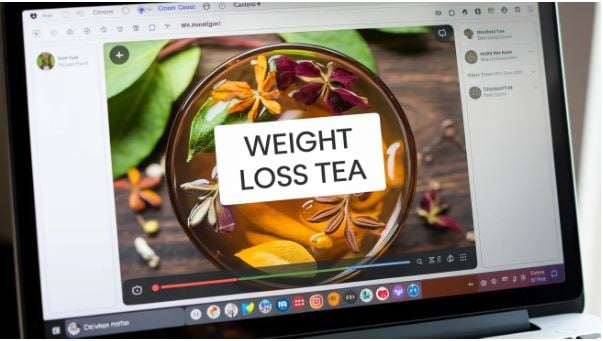
Add an Outstanding Thumbnail
Your thumbnail will determine whether people click on your videos. Therefore, make your thumbnail stand out with the following tips:
- Add a custom thumbnail. While YouTube automatically creates a still thumbnail for your video from one of the clips, it will not yield the desired results. Instead of that static image, create a custom, engaging thumbnail that captures your audience's attention.
- Use the right aspect ratio. For your thumbnail to appear in Google search results, it should be in the 16:9 format.
- Add a congruent image. Make sure the thumbnail clearly conveys what the video is about.
- Use contrasting colors. Don't use colors that blend with the search results, such as white, red, or green. Choose contrasting colors that make your videos stand out.
- Add a descriptive text. Use text on the thumbnail to make people know what your video is about. We recommend keeping it short to complement the video title.
In Conclusion
With competition on video platforms increasing, you need to find ways to drive traffic to your videos. One of the top ways to do that is to use video SEO to drive traffic from Google. By following the steps above, it should be easy to get your videos to rank in Google Search results.
