It is every YouTuber's dream to have as many people as possible watching their videos. If you are looking to increase your views, one of the most important things you can do is to increase your click-through rate. By understanding this metric and interpreting YouTube analytics data like a pro, you can open the door for a larger audience to watch your videos, boosting your views. In this article, we provide guidance on the YouTube click-through rate and how you can increase it.
What is the YouTube Click-Through Rate?
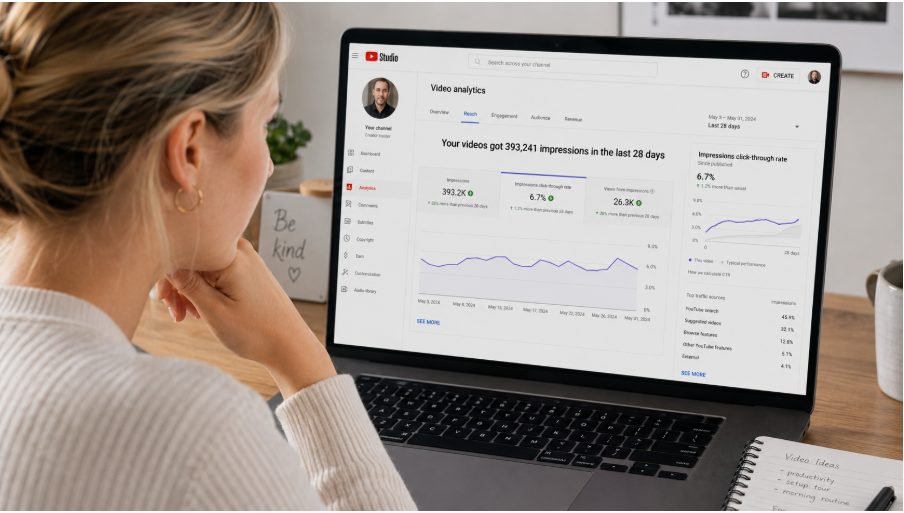
YouTube CTR is a metric that tracks how many times your audience has seen your videos after encountering your video's thumbnail. Each time your video thumbnail is shown to a viewer on the YouTube home feed, suggested videos, or search results, that counts as an impression. CTR shows the impressions that actually translate into a click.
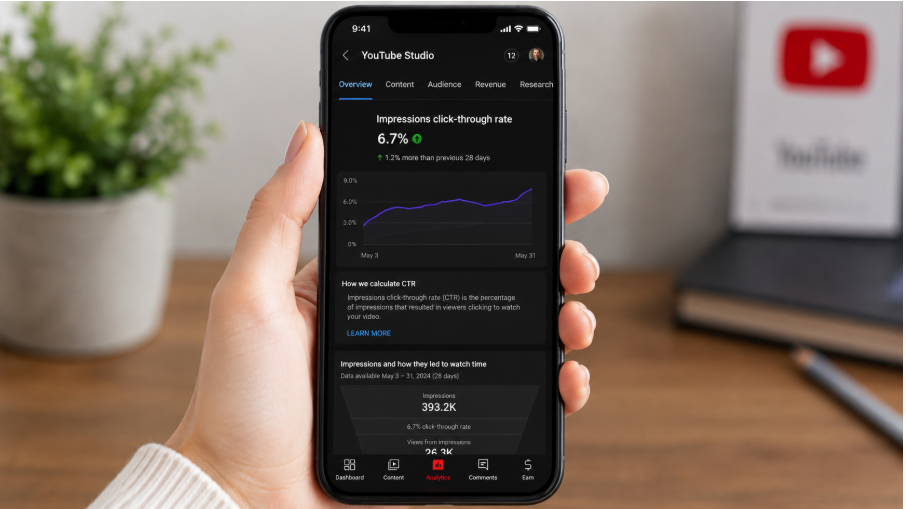
The metric is visible in YouTube Analytics data. However, you can also calculate it by dividing the clicks by the impressions, then multiplying the result by 100. For instance, if your video impression was 2000 and you received 100 clicks, the CTR IS 5%.
If your videos are getting a high CTR, the YouTube algorithm treats that as a signal that they're worth revisiting. If your channel has a high CTR, it means people are clicking your videos. However, this metric isn't tracked as a standalone metric, as YouTube considers it together with audience retention and watch time. That means getting a high CTR without high audience retention and watch time will not sustain your channel's growth.
It's also important to note how YouTube interprets impressions. An impression is counted when your thumbnail is visible on the user's screen for a minimum of one second. This could appear in the home feed, search results, suggested videos, and notifications, even though each traffic source has its own baseline CTR. Generally, the CTR is lowest for browse features (suggested or home feed) compared to search. This can be attributed to the fact that people searching on YouTube already have an idea of what they need.
How to View CTR on YouTube
To view the CTR on YouTube, you should:
- Visit YouTube Studio.
- On the left menu, click Analytics, followed by the Reach tab.
- You will see a graph option. Select the impressions CTR.
- Choose a data range to see your long-term trend.
Pay attention to the CTR of each video and the channel as a whole. If you get one underperforming video, it can bring down the average of your channel. When you check the average videos, you can see the titles and thumbnails. You can read our guide on title and thumbnail CTR optimization.
What is a Good YouTube CTR?
While this depends on the niche and channel size, the figure can range from 2 to 10%, as YouTube reports indicate this is the average CTR across 50% of all YouTube channels. While this is not set in stone, smaller channels often have higher CTRs than larger ones because YouTube will not show your videos to people who already know your channel. As the YouTube algorithm starts to recommend your videos to cold audiences who have never heard of the channel, the CTR starts to drop. This doesn't mean you are doing anything wrong. It means you are reaching new audiences.
Therefore, before you begin to panic because you are getting a low CTR, pay attention to the source of your impressions. If most of your impressions come from the Browse feature, a 3% impression rate is great. If you are getting more subscriber impressions at 2%, you need to investigate further.
Some of the recommended CTR benchmarks for different features are:
- Browse feature. Whether in suggested or the home feed, a CTR of 2-5% is considered good.
- YouTube Search. A good CTR for the search feature is 5-15%.
- Notifications. If subscribers are clicking to view your videos, a CTR of 10-20% is good.
How to Improve Your YouTube CTR
Now that you understand how to measure the CTR, let us look at some actionable steps you can use to increase it. These include:
Add Titles That Stir Curiosity
The title and thumbnail are the two most important factors that determine a video's CTR. It is advisable to arrange them so they complement one another rather than repeating the same details. A strong YouTube title should be:
- Speaking of a particular problem or target audience.
- Using specific numbers.
- Adding a curiosity gap to be resolved in the video.
On the other hand, avoid weak titles with generic labels, clickbait, or vague superlatives.
Increase Impressions
It's worth noting that the CTR and impressions go hand in hand. As noted earlier, when the impression shows the number of people who see your video, the CTR shows how many of those actually watch it. Therefore, while a high CTR is important, it's not enough to make your video go viral.
When you increase your impressions, your CTR will increase as well. This is why, when aiming to increase your CTR, you should also focus on increasing impressions.
Here are several tips to grow your YouTube impressions:
- Use a strong title and place the most essential details at the beginning.
- Start your video with a hook and avoid long intros.
- Publish consistently. This will provide the algorithm with fresh data for audience profiles, helping push your videos further.
- Leverage YouTube analytics to grow your channel.
Create an Outstanding Thumbnail
The thumbnail is one of the most important factors regarding whether users click your video. This is because it is one of the first things that YouTube audiences see.
Here are some tips for improving your YouTube thumbnails:
- Use an emotional human face. A face showing emotions is effective in grabbing people's attention. The emotions can take the form of surprise, curiosity, excitement, or even sadness.
- Avoid using too much text. Use no more than four words. If you need to add more information, the title can be a good place to do so.
- Use contrasting colors. Many YouTube users access the platform on small phone screens, so you need to make your thumbnails more visible. Using bold colors with some contrasting backgrounds will work well.
- Leverage the curiosity gap. You can use a curiosity gap that leaves something unresolved. It could be something like a face without context or a picture that raises a question.
- Understand your viewers. Instead of creating generic videos, use YouTube Analytics to check where the majority of your audience is coming from.
Check CTR by Traffic Source
When they notice their CTR is low, most creators rush to recreate their titles or thumbnails to increase it. While this is fine, they miss another important step: analyzing CTR by traffic source. If you notice a low browse CTR, it shows the thumbnail is the problem, not the title. If you see a weak search CTR, it means the title is the problem.
Understand Your Best-Performing Videos
One of the best places to find data on your own CTR is your analytics. All you need to do is visit YouTube Analytics and sort your data by CTR.
You need to ask yourself several questions, such as:
- What are the common elements in the best-performing thumbnails?
- Do they have a similar structure?
- What format or click is getting the highest number of clicks?
You should also apply the same rules to your video, which will result in a lower CTR. Determining a pattern in your channel is more important than offering general advice.
A/B Test Different Titles and Thumbnails
YouTube recently (in 2025) introduced an A/B testing feature that enables creators to test up to three titles, three thumbnails, or a combination of both for long-form videos. This can be a useful feature for helping you understand which of your videos is performing better. However, you need to do this early enough before a video reaches 1000 impressions. There is no point in changing an already well-performing video. If you notice a video stalling at a particular CTR, you can test the thumbnail before assuming the problem is the title.
Get the CTR Right in 48 Hours
While there is no official confirmation from YouTube, many creators suggest that the CTR in the first 48 hours determines whether you will aggressively promote the video to a larger audience. Therefore, you need to ensure that you get your CTR right within this period. To do that, publish and polish your titles and thumbnails within this period rather than trying to fix them later.
In Conclusion
While the CTR may seem like a simple number, it can have a profound impact on your YouTube video's performance and your channel's overall performance. If you get it right, YouTube will see it as a signal that your video is worth recommending to others. But if you get it wrong, you're not good at promoting videos that don't work. Therefore, use our detailed guide to understand CTR and optimize videos for it.
